doubleTwist Alarm Clock v1.3.6


doubleTwist Alarm Clock v1.3.6
Requirements: Android v2.2+, ROOT, GooglePlay Installer
Overview: Wake up to your music with doubleTwist Alarm Clock, the most beautiful Alarm app
doubleTwist Alarm Clock is hands-down the most beautiful alarm app in the Google Play Store, following doubleTwist’s history of simple, intuitive, highly functional, gorgeous apps, as seen with the doubleTwist Player media app.


"doubleTwist Alarm Clock has to be by far the most stunning of all time-watching apps on the market. In fact it is so good that I would consider switching to Android just for this app, for it is not available on iOS." – Om Malik, Gigaom


Gently awaken to your favorite medley. Or violently rouse yourself from deep slumber with death metal. The choice is yours!


Alarm Clock Features:
• Two clock modes: flip clock and analog clock, includes nightstand dim mode.
• Set alarm through one of four modes: Time, Sleep Cycle, Quick Nap, or Sunrise. Sleep Cycle helps pick optimal wake-up times to correspond with sleep cycles.
• Set multiple alarms.
• Set recurring alarms (weekdays, weekends, etc).
• Set a custom label for your alarms.
• Choose from built-in alarm sounds and ringtones or wake up to your favorite song or playlist (requires free doubleTwist Player app).
• Set adjustable fade in time for alarm volume.
• View time pending until next scheduled alarm.
• Set snooze duration and alarm volume.
• Swiss Clock live wallpaper.


doubleTwist Alarm Clock is handmade with ❤ in San Francisco.


If you have comments or feedback on our app, or need additional support, please visit http://doubletwist.com/contact/. Thanks!


Use of this app is subject to the doubleTwist Terms of Use and Privacy Policy: http://doubletwist.com/legal/


What’s New
New in v1.3.6:
* Implemented Slide to dismiss functionality to prevent accidental snoozing (no more excuses for getting up late!)
* Fixed digital clock display issue that affected a small number of users on high resolution screens.
* Misc bug fixes.
New in v1.3.5:
* Fixed a bug relating to the Quiet Mode feature.
New in v1.3.3:
* Require storage permission to fix crash that happens on Android 4.1 when "Protect USB storage" system setting is enabled.


This app has NO advertisements


More Info:


Code:


https://play.google.com/store/apps/details?id=com.doubleTwist.alarmClock&feature=nav_other&hl=en


Download Instructions:
http://uploaded.net/file/pkvxsihm


Mirror:
http://extabit.com/file/28ctlp91ihqjk

Read more

Headset Button Controller v7.2


Headset Button Controller v7.2
Requirements: Android 2.1 and up
Overview: Headset Button Controller is a small application that turns the button on a wired headset into a remote control for your music player – and much more!


Headset Button Controller is very configurable, allowing you to play music, change tracks, adjust volume, answer phone calls, start Voice Command and many other things, just by clicking the button on your headset.


Once you have configured Headset Button Controller with your preferences, it runs in the background using almost no CPU. It is shipped with a default configuration profile, but you can change almost every action performed. It has been tested with a wide variety of different Android devices and music apps and works with both single-button headsets, and Android-specific 3-button headsets.


Default configuration for single-button headsets (center button for 3-button headsets):
* Single press: play / pause (+ answer call / end call)
* Double press: next track (+ decline call / mute microphone)
* Triple press: previous track
* Quadruple press: previous track (2x)
* Long press: Volume control
* Press and hold: Fast forward [3]
* Double press and hold: Rewind [3]
* Triple press and hold: disabled


All of the above options are configurable to any of the following:
* Stop
* Play / pause
* Next track
* Previous track
* Previous track (twice)
* Mute / unmute
* Voice command
* Voice search
* Redial last number
* Say current time (Text-To-Speech required)
* Launch app
* Tasker task [1]


Additionally the long press options are configurable to any of the following:
* Volume control [2]
* Rewind [3]
* Fast forward [3]


With a 3-button headset, volume control is also configurable with the left and right headset buttons.
[1] If you have the Tasker app installed, you can specify any task – search for ‘Tasker’ in the Android Market
[2] While the button is held down, the volume is initially reset to the minimum limit (see below) and then raised until the button is released
[3] Not every music player app supports rewind / fast forward


Music app selection
You are able to choose which installed music app you want to control with Headset Button Controller.
Volume control features


Headset Button Controller remembers the music volume when the headphone is unplugged and can restore it when the headphone is plugged in again.
* Min volume limit: Start volume level of the ‘volume control’ command
* Max volume limit: Ensures that the headset music volume never exceeds this limit
* Volume control speed: Specify how fast you want the volume to be increased when using the long press option


Call features
You are also able to control calls with the headset button:
* answer call / end call on single press (configurable)
* decline call / mute microphone on double press (configurable)
* adjust volume during a call (see volume control)
* announce caller name (Text-To-Speech required)


You can also configure Headset Button Controller to automatically answer an incoming call after a configurable delay.
Headset plug in / out


You can configure an action to be performed when the headset is plugged in / out. By default the music will get stopped if you unplug your headset.


Profiles
You can create different ‘configuration profiles’ which you can switch between. Add a widget (1×1) to your home screen to easily change your profile. It is also possible to switch profile from the ‘Tasker’ or ‘Locale’ app. All settings can be backed up on SD card.


Notes
* Headset Button Controller cannot support the separate volume control buttons on the iPhone headset – this is a limitation of the Android framework.
* Make sure that this app does not get stopped by a task killer (the background process consumes almost no CPU).


What’s in this version : (Updated : Jul 29, 2013)
bugfix: Volume control did not apply beep sound volume setting
Notes:
Jelly Bean: The long press commands of the center button are reserved by Google Now and cannot be configured with this app.
Headset Button Controller cannot support the separate volume control buttons on the iPhone headset – this is a limitation of the Android framework.


More Info:
Code:


Code:


https://play.google.com/store/apps/details?id=com.kober.headsetbutton


Download Instructions:
http://uploaded.net/file/gumqpa1c


Mirror:
http://cloudzer.net/file/gj7jhj2z


Read more

ReLoop Loop Sequencer v2.0.7


ReLoop Loop Sequencer v2.0.7
Requirements: Android 1.5 and up
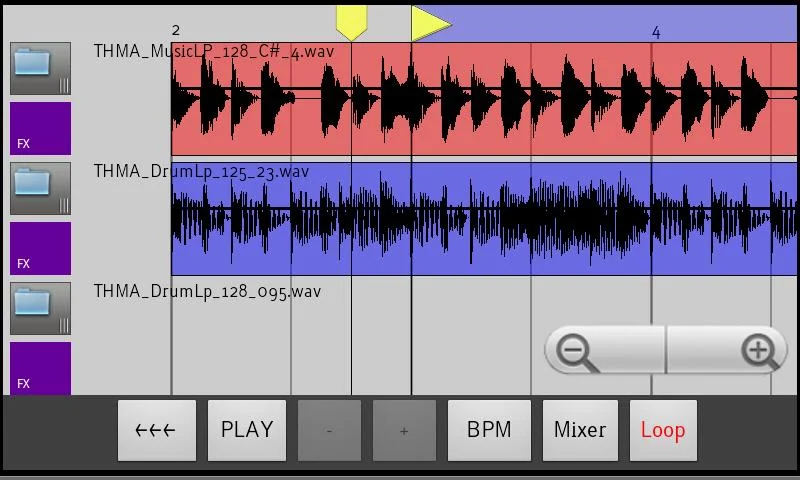
Overview: Quickly make music using samples and loops, just like Garageband or Sony’s ACID.

[break]
Real time live loop preview, hear how a loop will sound while currently playing what’s already programmed.
Get more samples for FREE by downloading ReLoop loop Paks from Android Market or from my website, OR load your own samples too unto your sdcard.
3 real-time FX : Delay, Low pass filter, and Distortion.

Easy to use interface – Drag/Drop loops on the timeline.
– TAP a track number to bring up a screen to load a sample or loop to that track.
– LONG PRESS a track number to bring up the FX dialog for that track.
– TOUCH AND DRAG TO THE RIGHT off a track number to add it’s sample to the timeline
– LONG PRESS a sample to select it for further editing.
– LONG PRESS a sample AND DRAG TO THE LEFT OFF THE SCREEN to delete the sample from the timeline.
– LONG PRESS a sample and move it left to right to move its position on the timeline.
– CHECK THE MENU for even more operations such as slice, copy, undo, snap, etc.


CD quality sound (44Khz 16bit stereo).
WAV import – LOAD YOUR OWN samples and loops from SDCARD. File location is /sdcard/reloop/samples.
Use my Sonic Chop app (sold separate) to chop samples from MP3′s on your device and load them right into ReLoop!
24 bit WAV support, no need to convert your samples or loops to use them. Use samples from loopmasters, primeloops, etc, right away.
CHANGE PITCH on one-shot samples to build melodies
SLICE loops and rearrange.
SNAP up to 1/16, or turn off SNAP and lay samples wherever you want.
COPY/PASTE samples or entire blocks
WAV Export.
Uses as much screen space as you have, works great on Galaxy tablet screens.


What’s New
2.0.7 – added a menu icon top right for easier access to menu on android 4.x and higher devices
2.0.6 – easier scrolling on the timeline screen, you can now fling and have it smoothly scroll more quickly


This app has no advertisements


More Info:


Code:


https://play.google.com/store/apps/details?id=Loop.ReLoop


Download Instructions:
http://ul.to/csm6qk4t


mirror:
http://extabit.com/file/29g33hmgjr99a/
http://hugefiles.net/0aqwhr0x2j6f


Read more

D-Photo Measures v3.4.0


D-Photo Measures v3.4.0
Requirements: 2.1 and up
Overview: Draw measures and dimensions on photos and share the result with others.

[break]
D-Measures has evolved into D-Photo Measures. It’s not just a new name and a new icon. With the new zoom feature will allow you to draw even more easily when objects are close to each other.
This powerfull application let’s you draw measures and dimensions on a photo. After photos are marked up with measurements, they can be send to anyone, or exported to the media gallery. Remember that a picture is worth a thousand words.
An indispensible tool for construction workers, engineers, architects, carpenters, real estate agents, auction sellers, …
————- Sketch ————-
– Use a photo from the media library of your phone or take a new photo with the camera.
– Dimension arrows: 5 types.
– Angles
– Text boxes to point out details.
– Draw free-hand annotations.
– Metric and imperial units: m, cm, mm, yd, ft, in and ft-in.
– Different colors for arrows, angles and text boxes. Use the color that’s the most visible on the picture or use a specific color for specific purposes.
– Graphical indication of the dimension that will be moved, edited or erased.
– Zoom function to work more precise.
————- Organize ————-
– Custom photo names.
By default, the photos are named for the current date and time. Long-press the photo to pop up the context menu that allows you to rename the photo.
– Folders.
Organize your drawings to folders to keep an overview by project, customer or location.
————- Share ————-
– Share full size photos with measures and dimensions.
– Share multiple drawings and folders with one click.

What’s New
Version 3.4.0
Bugfixes:
– Size of annotations on generated PDF documents now approaches the size on device
New Features:
– Organize your drawings in sub folders.
– Add annotations to uni directional arrows.


This app has no advertisements


More Info:


Code:


https://play.google.com/store/apps/details?id=com.dsol.dmeasures


Download Instructions:
http://ul.to/7ly7eyjq


mirror:
http://extabit.com/file/29g33hmgo4hoe/
http://hugefiles.net/9ct8eo16efgw


Read more

PhoneWeaver v2.5.0


PhoneWeaver v2.5.0
Requirements: Android OS 1.5 +
Overview: Define smart profiles activated based on time, agenda, power state and location!


The ultimate profile manager! Define smart profiles that are activated manually or automatically based on time, schedule and meetings, power connection and even location!


Each profile can completely control your phone’s volume/vibrate, ringtones, notifications, WIFI, Bluetooth, 3G data, GPS, Wallpaper and more. You can even launch applications when a profile is activated!


With PhoneWeaver, your phone adopts to your lifestyle the way a smart phone should!


The home screen widget offers instant control of PhoneWeaver and your phone profiles. Switch profiles with a single tap, setup event triggers and make your phone adapt to your needs, quickly.
PhoneWeaver is a complete and advanced profiler that can fully automatize your phone tasks and help you ensuring you won’t ever miss a cal because you have forgotten to remove the mute mode, launching your GPS navigation program as soon as you dock the device in your car, saving battey by adapting mobile data, WIFI, Bluetooth, brightness, etc. to your specific need for each situation without you even need to select anything!


With the optional module CallWeaver, you can also block undesired calls or SMS while at certain sites, or time… ensuring you will still seceive those calls important for you.


FEATURES LIST:


PROFILE TRIGGERS
Events that cause a profile to became active:
Manual / Time. For manual or timed selection. Can optionally have launch times and / or a defined duration after witch it expires.
Default Time. Up to four different hours to start and what days of week shold work can be defined per profile.
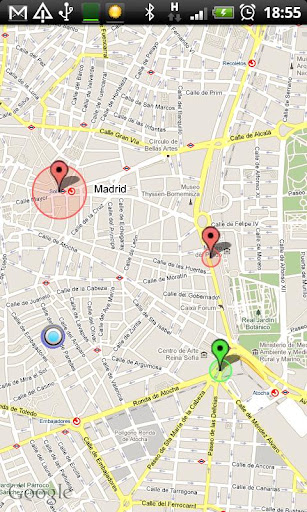
Location. Automatically trigger the profile when the device is near a certain geographic point and exit profile when exiting.
Agenda. The profile can trigger on specific calendar appintments. Many filters are available.
Connections. Profiles can be automatically triggered when the device connections change, inluding wifi, power, bt, etc.


PROFILE CONTROLLED PDA PARAMETERS
PDA Parameters can be asigned to a profile and activated with it:


Sounds and notifications
————————-
Ring type.
Notifications type.
Ring volume.
Call volume.
Linked Notifications volume to ring volume.
Notifications Volume.
Multimedia volume.
System volume.
Alarm volume.
Ringtone.
Notification tone.
Repeating alarms.
Radio and comunications control
——————————-
Bluetooth
WIFI
Phone
GPS
Cellular data connection
MMS data connections
Autoanswer calls
Autospeaker
Data Sync
Screen
——
Screen Timeout
Backlight
Auto rotate
Auto lock
Home wallpaper


OTHER FEATURES
————–
Run program on porfile entering and close it on exit.
Automatic SIM PIN entering
1×1 and 4×1 Widgets
Optional taskbar active profile icon
Profile Lock
Manual profiles expiration timer
Options for backup/restore profiles
Complete, maps based location editor.
Localized to: English, German, Dutch, Korean, French, Spanish, Italian, Portuguese, Chinese (Simplified), Czech, Russian, Polish, Japanese.
Auto recalculation of profiles on Time Zone change or Time set.
Auto recalculation of profiles on system reboot.
Integrated access to PhoneWeaver Manual, FAQs and SBSH Facebook and Twitter pages.
Number of profiles: Unlimited
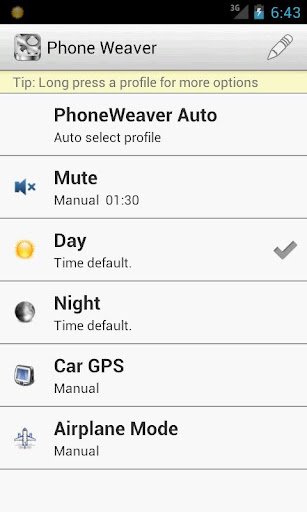
Sample profiles: Five sample profiles: Mute, Day, Night, Car GPS and Flight mode.
Disable: A profile can be disabled, maintaining its definition but not afecting to the PDA behavior.
Hide: A profile can be hidded, maintaining its functionality but not appearing on selecting menu.


What’s in this version:
Now locking a profile fully stops PhoneWeaver, even background chekings.
Added an option in settings to disable Timezone control for the case your neighbours cells are causing issues.
Solved wifi changes on some Jelly Bean devices.
Solved a NFC related force close.
Solved a NFC profile icorrect behaviour when only manual profiles are defined.


More Info:
Code:


Code:


https://play.google.com/store/apps/details?id=net.sbsh.phoneweaver


Download Instructions:
http://uploaded.net/file/b8zg7aje


Mirror:
http://cloudzer.net/file/5oyvkbhj


Read more

Now Playing v1.6


Now Playing v1.6
Requirements: 2.3 and up
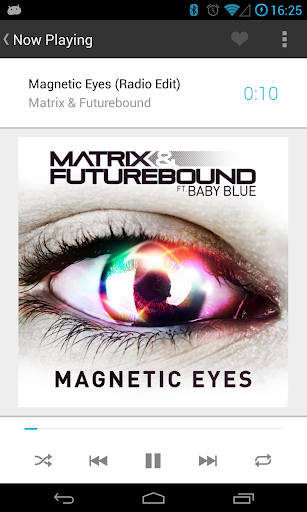
Overview: Now Playing is a powerful, elegant music player for Android.


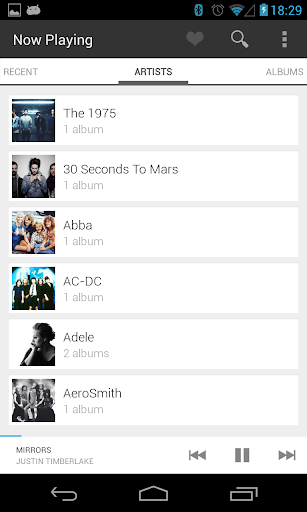
Featuring a simplistic Google Now-esque theme, Now Playing is the most beautiful Music Player in the Play Store.


Now Playing is streamlined, containing only the necessary features, without the bloat and complex UI’s of the competing music players.


Now Playing’s streamlined approach to your music collection allows you to quickly navigate your library to find the song you’re looking for. It’s built in search function speeds this process up even further if you already know what you’re looking for.


Features:
• Compatibility with your phones built in equaliser. If your phone did not come with one, one can be downloaded from the Play Store.
• Share your currently playing songs on Twitter/Facebook/Google+ or anywhere else you like with one tap.
• Automatically fetches lyrics for the currently playing song.
• Automatically downloads Album/Artist art from Last.FM.
• Scrobbling to Last.FM. (Soon)
• DashClock Music compatibility.


Gestures/Navigation:
• On the Now Playing screen, swipe to the right to get to the song queue. Swipe to the left to fetch lyrics for the currently playing song.
• Tap the bottom bar to goto the Now Playing screen from anywhere in the app. Swipe the bottom bar audio controls to expose shuffle and repeat options.


What’s in this version : (Updated : Jul 26, 2013)
Back to Google play


More Info:
Code:


Code:


https://play.google.com/store/apps/details?id=com.underwood.now_playing


Download Instructions:
http://uploaded.net/file/sqbfjct5


Mirror:
http://cloudzer.net/file/12egjt5m


Read more

Quad Drawer, quick app drawer v1.0.2


Quad Drawer, quick app drawer v1.0.2
Requirements: Android 2.3 +
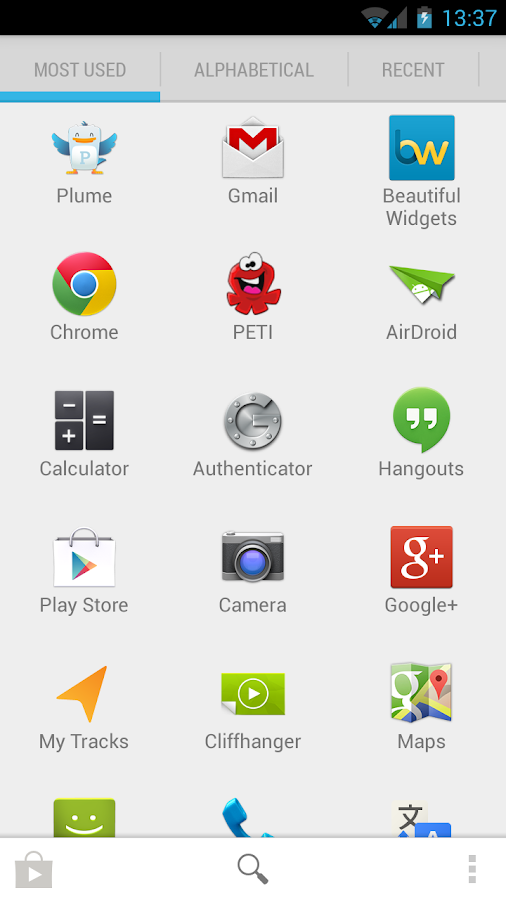
Overview: Quad Drawer is the quickest way to launch apps. It’s a simple app drawer: using the predictive keyboard, just type a few letters of the app you’re looking for and Quad will bring it to you.


Quad Drawer, your apps, quicker!
How much time do you spend searching your apps on your device? A lot for sure!
Now, Quad, the app drawer solves your problem.
You want to go quicker? You don’t want to return to your homescreen to launch your app drawer? We solved that! Go to your settings, and activate “Floating window”. Now, you can access Quad Drawer from any app by touching the floating icon.


“Ok! That’s good but it’s not enough” you may think. We thought too, so we added more features.
Because all Android users are not launching apps the same way, many options are available in this app drawer:
– Select how you want to sort your apps (alphabetically, by most used, by last used, by install date)
– Select how your apps are displayed (grid or list)
– Select the keyboard you want (default or predictive)


Quad Drawer provides a light and a dark theme. Choose the one that suits you the best according to your system and your personal tastes.


With Quad Drawer, you will never lose time searching apps, and you’ll save a lot of room on your homescreen so you can add more Beautiful Widgets


What’s in this version : (Updated : Jul 30, 2013)
Performance improvement
Column number setting
fixes


More Info:
Code:


Code:


https://play.google.com/store/apps/details?id=com.levelup.quad


Download Instructions:
http://uploaded.net/file/fizq5b04


Mirror:
http://cloudzer.net/file/059m5n9h


Read more

Smart IR Remote for HTC One v1.3.1


Smart IR Remote for HTC One v1.3.1
Requirements: 4.1 and up
Overview: You can now use your phone as an Infrared Remote (IR Remote)

[break]
Why should you need to use more than one remote for all the devices you own ?

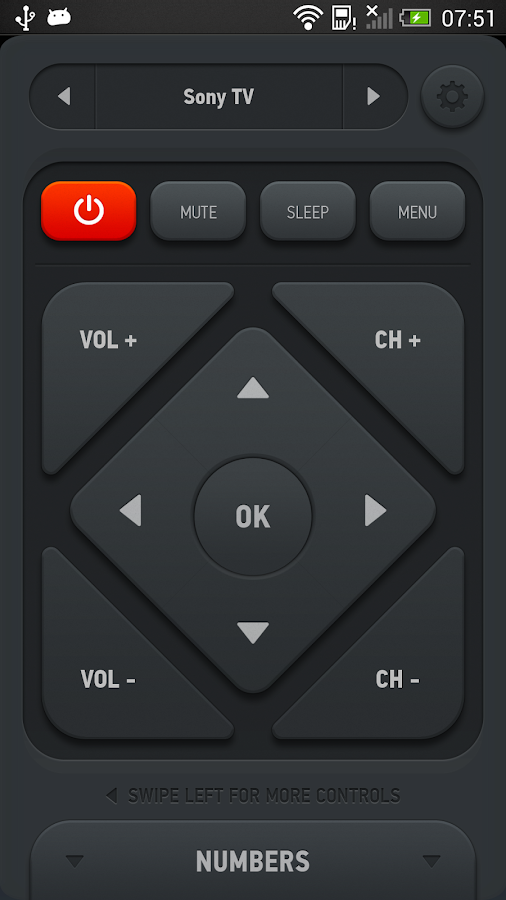
With Smart InfraRed Remote for your HTC One, you can add, create and customize any number of remotes, combining controls from any of your existing remotes. Imagine a single remote on which the CHANNEL UP button controls your Set Top Box from your TV provider, the VOLUME keys control your home theater system and the arrow keys control your TV’s menu.


On top of all that, since you’re holding a phone, why not use some of it’s unique features?


AUTOMATIC MUTE WHEN YOU GET CALLED
Don’t you hate it when you receive a call but can’t hear the other person because the TV is too loud? Now, Smart Remote can automatically mute your current device when someone calls you.


DYNAMIC VOLUME – BETA
Smart Remote will automatically turn down your volume when there are sudden high-volume sounds (think movie explosions), or it will turn up your volume when the sounds are too low to hear (think actors’ voices not being loud enough)


What’s in this version:
– Added full remote learning capabilities. Settings -> Record Remote
– Added more languages: German, Spanish, French, Japanese, Korean, Norwegian, Romanian and Swedish
– Added Resizable widgets! *only guaranteed to work with the default launcher
– Added short tutorial which shows on first run to present the most important features
– Added XBox 360 support, improved remote setup process, navigation between many remotes (try pressing the remote name), other minor improvements and bugfixes


This app has NO advertisements


More Info:


Code:


https://play.google.com/store/apps/details?id=com.remotefairy2


Download Instructions:
http://ul.to/of4673ji


Mirror:
http://extabit.com/file/29g33hmgo5ggu/
http://hugefiles.net/a3e136oqike6


Read more

Swipe Dialer Pro v1.8.7.1 Mod


Swipe Dialer Pro v1.8.7.1 Mod
Requirements: Android v4.0+
Overview: Fed up with your slow dialer, Would you like a more stock (AOSP) android experience? Would you like to swipe effortlessly between your dialer, contacts, recent and favourites with no LAG!


Fed up with your slow dialer, Would you like a more stock (AOSP) android experience?


Would you like to swipe effortlessly between your dialer, contacts, recent and favourites with no LAG!


+ Full T9 support
+ Set as default
+ Speed dial (Pro Only)
+ Keep in memory (Pro Only)
+ Totally customisable tabs (Pro only)
+ Customisable Transition effects (Pro Only)
+ Cover flow for contacts; Just turn your phone landscape (Pro only)
+ Custom fonts, Backgrounds, Colours just about every item! (Pro only)
+ Use your own background (Pro only)
+ Change dial pad colour (Pro only)
+ One handed dialer mode for large screen devices (Pro only)
+ English, German, French, Norwegian, Spanish, Hindi, Hebrew, Norwegian, Polish, Portuguese, Russian, Ukrainian, and Chinese support
+ Indexed contact list
+ Phone number formatting
+ Stock android style
+ Big favourite photos
+ Very fast
+ Delete one or all call logs via long press
+ Copy & Paste & Edit phone numbers
+ Send SMS’s, edit or call contacts via long press
+ Haptic feedback f000h
+ Pressing dial brings up last called number
+ Sort by surname in contacts list
+ Configure dialer sounds


Any problems email me :)


Screenshots are from the pro version.


Keywords: dialler app,dialler,diallers,t9 dialler,predictive dialler,phone,dialer,dial,T9,contact,contacts,smar t dialer,quick dial,speed dial, aosp, stock, fast,dialer predictive ,pronto dialer, dial, dialing


Recent changes:
Please, please if you like the app rate it
1.8.6.4
+ Fix: Animation and lag issues on some phones
1.8.6.3
+ Call log grouping
+ Landscape mode
+ All translations updated
– Turkish added thanks cumaorhan
+ Keep in memory improvements (Pro only)
+ Ability to hide the dial pad on launch
+ Fix : Ghosting issue on some HTC Phones
+ Fix : Issue with contacts icon not loading
Less description »


Note: all premium features available.


This app has NO advertisements


More Info:


Code:


https://play.google.com/store/apps/details?id=com.mb.swipedial


Download Instructions:
http://uploaded.net/file/m55utff3


Mirror:
http://extabit.com/file/28cleni7zct9c


Read more

Relativity Wars v1.6


Relativity Wars v1.6
Requirements: 2.0.1 and up
Overview: ★ Best space RTS on Google Play
★ Most original strategy game of the year

Relativity Wars is an awesome god-type strategy game, set in a universe which obeys Einstein’s theories of relativity! You will be exploring the universe, commanding fleets and deploying weapons that bend the very fabric of space and time.


In Relativity Wars you play a God commanding a civilisation as they begin to explore the universe. Guide your charges in epic real time space battles against the Squishian menace!


Relativity Wars is one of the most beautiful and polished games on the service. You will be playing in a gorgeously rendered galaxy and guided through the experience by an AI with full voice-over.


Start your campaign today, you’ll be conquering the universe before you know it, and you might even learn a bit of science!


Note: A network connection is required to play


★★★★★★★★★★★★★★★★★★★★★★★★★★★


Praise for the xbox version of Relativity Wars


".. As of the writing of this review I’d even consider this the best the service has to offer." – gofanboy.com


"What helps it to distinguish itself though is its use of physics, and its interesting take on space warfare. Who needs ships when it’s possible to send a space/time wave across the galaxy to distort gravity?" – gamingunion.net


"a very enjoyable RTS for the armchair general who wants a fresh new alternative. The gameplay is balanced and thorough, trust that physics is the deadliest tool in space." – xboxhornet.com


Relativity wars takes RTS Strategy to the next level. You will be creating an empire in space and learning about Einstein and his theory at the same time. Lead your kingdom across the galaxy and clash with other empires around suns burning with intense fire.


Relativity Wars aims to teach complex concepts and the big bang in a fun game environment free from the feeling of having a teacher standing over you. With some beautiful NASA imagery (thanks to the amazing royalty free image repository at NASA) and great star and planet rendering. The universe really comes to life in Relativity.


Your galactic civilisation with gradually learn more science words and unlock many inventions as you guide them across the universe. You will find strange clans of aliens living their life in the galaxy of stars you explore. Each star is orbited by many planets, some can support life, others are barren like the moon. It can be a long trek to get from one planet to another as spacetime warps and flow around your ship and it has a greater gravity effect.
The game has wormholes that will suck your enemies into a great tube like a subways and spit them out somewhere else in time and space and make them run away..


Relativity Wars has a free trial as well as paid version. Tell your friends to play as well with facebook integration. You won’t have to hold a blade to their neck to get them to play as the game is great fun!


Unlock many exciting new buildings such as the science research centre and the Temple, as well as great weapons like the space-time bomb which will make enemies slide like surfers into the nearest sun.


Relativity is an awesome RTS game as it has the infinity of space and great science thrown in for good luck. Can you strike at the squishian monsters and defeat the greatest evil empires since the big bang. With lasers, explosions bending space and time and great star rendering the the real time battle really looks a treat. Go on give it a go, science has never been so much fun! You might just learn something!


What’s in this version: (Updated : Jul 18, 2013)
Removed IAPs, re tuned as a pure singleplayer experience
Thanks for playing Relativity Wars!


More Info:


Code:


https://play.google.com/store/apps/details?id=com.fungameco.relativity


Download Instructions: Released by : chathu_ac
http://uploaded.net/file/zs9uszzq


Mirror:
http://clz.to/mqnnmj68
http://rapidgator.net/file/44dd662bb…a88c0f2e13751/


Read more