GO Launcher EX Prime v4.02 beta1


GO Launcher EX Prime v4.02 beta1
Requirements: Android v2.2+
Overview: GO Launcher EX is the extended version of GO Launcher, one of the most popular home apps in Android Market. It’s a highly customizable home replacement application, which will run when you press your android phone’s HOME key. GO Launcher EX supports hundreds of themes, fast flip speed and tons of useful functions.


GO Launcher EX is the most popular Android home launcher replacement app in Google Play. It offers you many first-ever features to customize your own homescreen experience. Go launcher EX provides you speedy and smooth operation, fancy and plentiful themes, and utility functions with imagination.


Facebook: http://www.facebook.com/pages/GO-Launch … 9522355878


Twitter: https://twitter.com/#!/golauncher


Key Features:
☆ Extremely smooth transition animation
☆ Smooth flipping operation
☆ Thousands of personalized themes
☆ Amazing custom gestures feature offers you more convenience and fun
☆ Various GO widgets (weather, switcher, calendar…)
☆ Efficient and strong app management function, including sorting, hide app, search, cleaning memory and refresh.


New features:
– Supports GO Launcher super themes (more homescreen effects),the last pic above is our "Dryad Super Theme".(Search "Dryad" in google paly, it’s free to download)
– Draw patterns to active apps (double click on home screen to active custom gesture)
– Squeezing effect of icons and widgets (Jelly Bean style)
– Drag and swinging icon upward to delete icon or widget.


Tips
1. How to get themes, widgets and lockers?
a) Search ‘go launcher theme’, ‘go widget’ or ‘go locker’ in Android Market.
b) Use GO Store via menu button in GO Launcher.
2. How to set transition animation?
Use ‘Effects settings’ via button in GO Launcher.
3. Icons are too small?
Use ‘Icon Size’ option in ‘Preferences->Visual settings->Icons’ to make icons bigger.
3. Long press the app icon to enter editing mode on home screen and app drawer.
4. Glide up to open menu and glide down to pull down notification.
5. The widgets in the screenshots belong to GO Widget, attainable from Android Market or GO Store.
6. File browser can be found in the lower left of app drawer.
7. Process management feature is found down the running tab of app drawer. Clicking the broom icon and clean the memory.


Important:
1. GO Launcher is a totally free app without any charge.
2. If you cannot set ‘GO Launcher’ as the default home app, download ‘Home Manager’ to fix it.
3. ‘DIRECTLY CALL PHONE NUMBERS’ permission?
It’s required by the feature to create shortcuts of ‘person’ and ‘direct dial’. GO Launcher won’t make unattended phone call and cost your money.
5. ‘READ CONTACT DATA’ permission?
It’s required by the feature to create ‘person’ shortcut as well as to add contact folder.


Our commitments are respecting user privacy and delivering cool experience. Please help us by rating this app and recommending to the others.
Want an extreme makeover to your phone? Try it out!
Follow Us on
Facebook: http://www.facebook.com/pages/GO-Launch … 9522355878
Twitter: https://twitter.com/#!/golauncher
Owned by and Visit 3G.cn Through Your Mobile.
Copyright 2004-2012 All Rights Reserved.


Recent changes:
(New) Support to batch uninstall long-term unused apps
(New) Add GO FileMaster (MENU->All plugins)
(Improve) Brand new menu designed for UI4.0
(Improve) The operation of Auto-folder
(Fix) Direct dial function does not work
(Fix) Long press menu key to enter the Google search does not work
(Fix) Theme display issue on hide app interface
(Paid) Add side dock which is available on any interface (Preference->Appearance settings)


Visit Website
Less description »


Note: all premium features available. no key file needed.


This app has no advertisements


More Info:


Code:


https://play.google.com/store/apps/details?id=com.gau.go.launcherex


Download Instructions:
http://uploaded.net/file/f90ch88j


Mirror:
http://extabit.com/file/28ctlmm3eu08w

Read more

F18 Carrier Landing v5.81


F18 Carrier Landing v5.81
Requirements: 2.1+
Overview: Mobile Aircraft Carrier Landing Simulator !


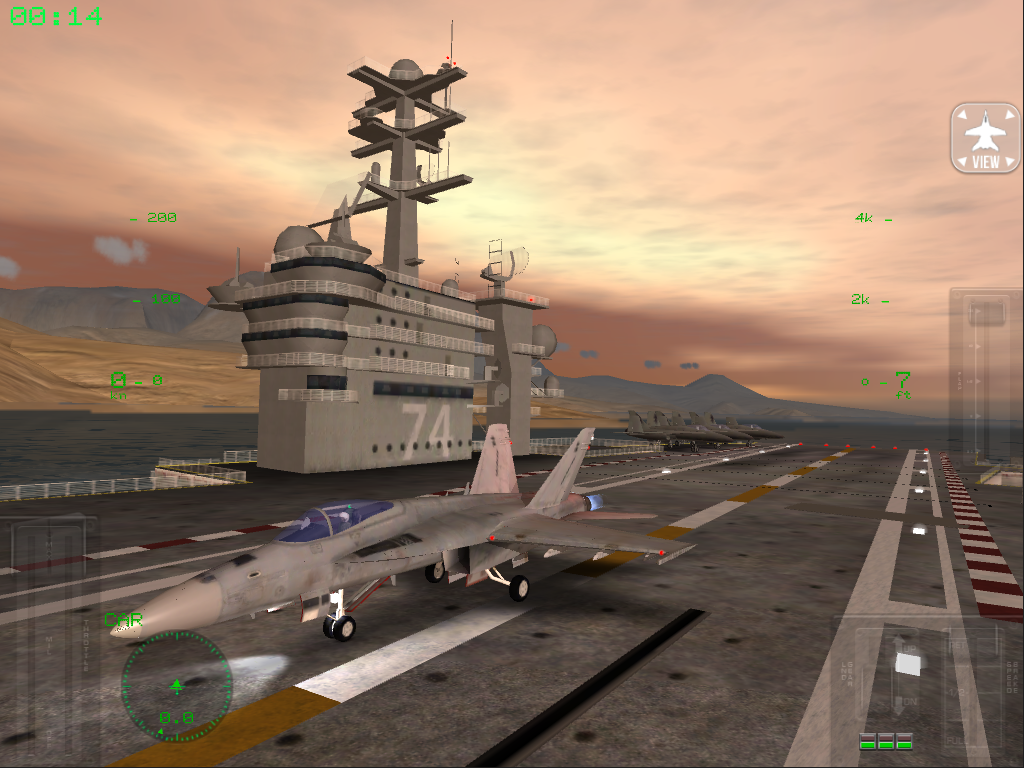
Landing on a flight deck is one of the most difficult things a navy pilot will ever do. The flight deck only has about 500 feet (about 150 meters) of runway space for landing planes, which isn’t nearly enough for the heavy, high-speed jets F/A-18 Hornet. Like a Top-Gun pilot enjoy afterburner, tonneau, loop.


You will be the pilot of F/A-18 Hornet, F-14 Tomcat and C-2A Greyhound aircraft flying in virtual environments with a stunning graphic. You will have the possibility to see again your performances with 30 seconds REPLAY function with the possibility of changing the point of view switching between several cameras and immediately share personal screenshots on Facebook and Twitter!


For a worldwide challenge!
Happy landing!


Features:
Missions: Gameplay Engine with six different missions.
Enjoy Start your flight from carrier, learn to land on the ground airbase, go for patrol and photo reconnaissance.
Learn levels
Free/Random Landing level with advanced weather conditions settings (wind, rain, fog) and different scenarios (day, dawn, overcast, night).
Other features:
Multi-touch controls.
F/A-18 Hornet cockpit view mode.
I.F.L.O.L.S. approaching system.
XPERIA PLAY Optimized


What’s in this version:
* Aircraft 3D Virtual Cockpits.
* A-6 Intruder.
* Gameplay 12 Missions.
* In-Flight Refuel.
* New detailed graphics.
* Dynamic-pan camera system.
* Radio Audio.
* Multi-camera replay function with dynamic-pan.
* Two landscape scenarios.
* Quick guide.
* Remote control: connect two devices on local network for remote control session.


More Info:


Code:


https://play.google.com/store/apps/details?id=it.rortos.f18carrierlanding


Download Instructions: released by chathu_ac
http://ul.to/wbk0v9fs


Mirror:
http://clz.to/a65epavh
http://rapidgator.net/file/c31b027ed…98dfac907521a/


Read more

Popup Widget v1.3.0 (Proper)


Popup Widget v1.3.0 (Proper)
Requirements: 2.2 and up
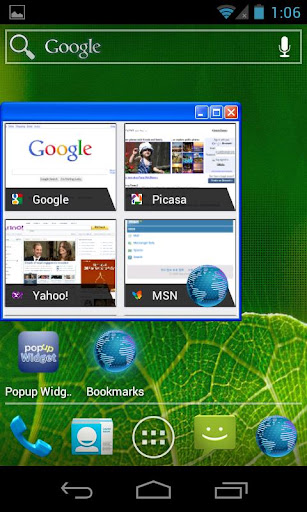
Overview: You can create a shortcut to a widget. The widget will appear with a cool animation when clicking the shortcut.


Now this supports more features than ssLauncher, 20 or more internal background skins and changing animation speed and effect.


Main benefits of using popup widget:
1. less memory use of launcher
2. better scroll performance of launcher
3. protect widget from touch miss


What’s New
v1.3.0
– supports backup/restore
– supports custom image skin
– enabled to select x and y position separately
– fixed some bugs


More Info:
Code:


Code:


https://play.google.com/store/apps/details?id=com.ss.popupWidget


Download Instructions:
http://uploaded.net/file/n8tsfkn4


Mirror:
http://cloudzer.net/file/zwv9ewu9


Read more

Archos Video Player v7.5.9


Archos Video Player v7.5.9
Requirements: Android 4.0.3+
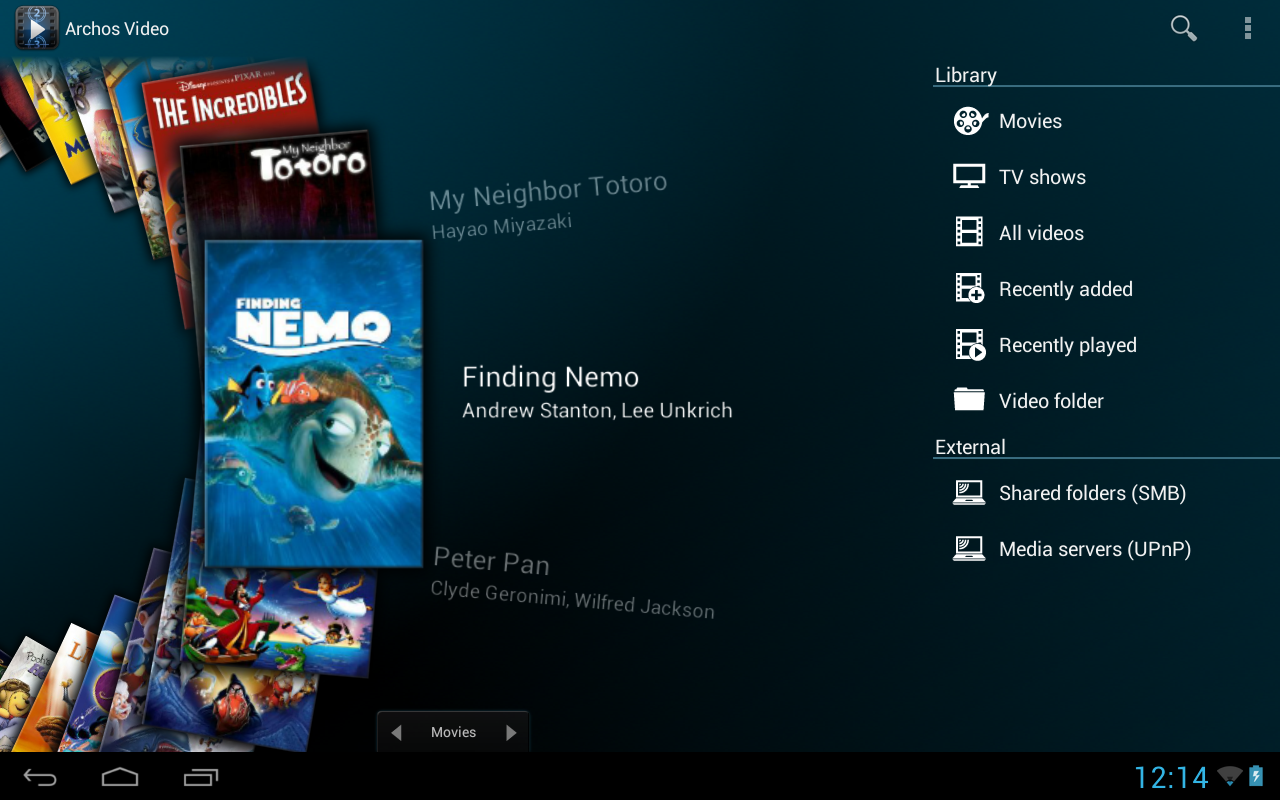
Overview: ARCHOS makes Video Player app available for all Android tablets and phones (requires Android 4.0 or later)!


The critically acclaimed Archos video player app offers an uncompromised multimedia experience.
– Hardware accelerated video decoding support for most devices and video formats;
– Ability to play content from any computer/network storage in your local network (SMB and UPnP) or from an external USB storage device;
– Automatic online retrieval of Movie and TV show information with poster and backdrop for both local and network content;
– Integrated subtitle downloader;
– Network indexing: import remote shared folders (SMB) in your multimedia library;
– Video browsing with either folder or library based navigation;
– Ubiquitous access to TV shows sorted in a series/season/episode hierarchical view;
– Multi-device network video resume;
– TV friendly: Keyboard/remote control compatible.
* Note that if you experience any issue with video hardware decoding you can force software decoding in Archos Video Player application settings to watch your video.


What’s New


7.5.9 – August 1st, 2013
– fix audio video synchronization regression
– resolve video not playing smoothly regression


This app has NO advertisements


More Info:


Code:


https://play.google.com/store/apps/details?id=com.archos.mediacenter.video


Download Instructions:
http://ul.to/km596kww


Mirror:
http://rapidgator.net/file/8af9d8b67…Hch0a.zip.html


Read more

A ground breaking way to twitter more 140 characters!

Hey guys, I want to recommend you a new android app, which will help you to send more than 140 characters in on tweet! The name of it is Giantwit! It is different from other ways to achieve the goal, it won’t lead you to another page or separate your tweed into small pieces. You type giant of text, then the app put all of them into a picture, and post it! So your friends can click on the picture and read your GIANT TWEET! It’s really useful, but there’s only android version. :o kksm: So, if you are using an android phone or whatever, give it a try, you’ll love it, guarantee! Try it in your Google Play, Giantwit
Read more

BusyBox Pro v9.7.7


BusyBox Pro v9.7.7
Requirements: Android version 2.1 and higher
Overview: The fastest, most trusted, and most popular BusyBox installer and uninstaller! Over 2 million installs! Winner of best Utility Software award for Android via Handster. This is the ONLY Installer on the market that will allow you to remove Busybox (If supported on your phone) AND the only open sourced installer!
[break]

Source: https://code.google.com/p/busybox-android/
Featured on the BusyBox website at: http://busybox.net/products.html
The BusyBox source code can be found here: http://git.busybox.net/busybox/


A must have for any rooted phone! Almost EVERY rooted applications needs BusyBox to perform their magic, if you have a rooted phone then you need BusyBox.


Pro version contains no ads or nag screens, uninstall feature, custom tune feature, the ability to hand pick the applets you want, safety check for missing applets on start, and better overall support. The pro version will receive more frequent updates than the free version will.


This installer has the smallest Busybox binaries available, right around 700kb unlike the other installers which are over a meg. Also this installer does not require you to download anything extra like other installers do and thus works much faster.


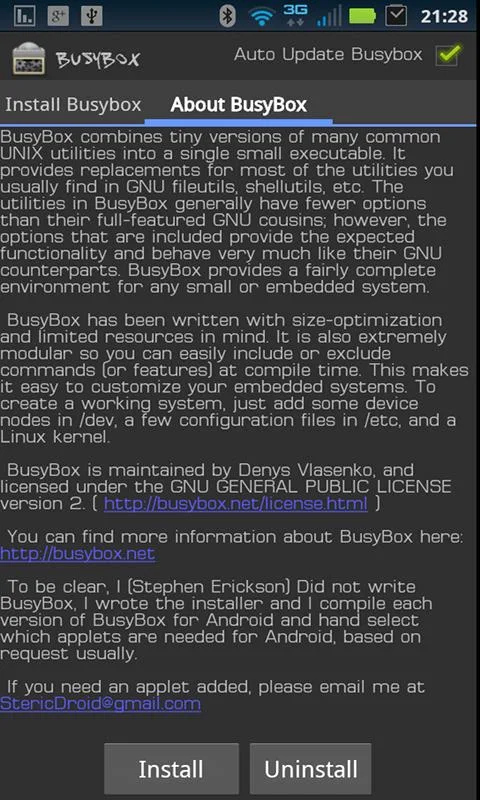
Please note I did not write BusyBox! I wrote this installer, cross compiled BusyBox for Android. Please see the about menu option for more details or here: http://www.BusyBox.net


BusyBox is a software application that provides many standard Unix tools, much like the larger (but more capable) GNU Core Utilities. BusyBox is designed to be a small executable for use with the Linux kernel, which makes it ideal for use with embedded devices. It has been self-dubbed "The Swiss Army Knife of Embedded Linux".


This version includes 1.19.4, 1.19.3, 1.19.2, 1.18.4, and 1.18.5 no need to have more than that because it takes up space on your phone and each newer version will still contain the older features, unless I forgot to compile them in.


Leave this installed if you always want to get the latest version of busybox!


tags: busybox, utility, terminal, emulator, root, stericson, adb, toolbox, rom, unlock, jailbreak, root, linux, unix, shell, script, tools, android, installer, busybox installer, (Confirmed Amazon)


What’s New
v9.7.7
Added new permission (boot completed)
New permissions is used to facilitate the new feature added to address issues that some users have when they have a kernel that keeps a consistent version of busybox in sbin. New option is in the settings menu.


This app has NO advertisements


More Info:


Code:


https://play.google.com/store/apps/details?id=stericson.busybox.donate


Download Instructions:
http://ul.to/y163u05v


mirror:
http://hugefiles.net/ikk36nii9dwi


Read more

franco.Kernel updater v10.1.2


franco.Kernel updater v10.1.2
Requirements: 4.0+
Overview: A well established top-100 paid app with one of the highest ratings in the Play Store!


With a powerful and beautiful UI it combines a series of powerful tools to manage your device with franco.Kernel. Basic functionalities such as Backup & Restore or CPU frequencies will work independently of the Kernel for the supported devices.


It’s localized to: Vietnamese, German (Germany), Dutch (Netherlands), Polish (Poland), Chinese (China), Portuguese (Brazil), French (France), Turkish (Turkey), Spanish (Spain), Italian (Italy), Hungarian (Hungary), Russian (Russia), Czech (Czech Republic).
If you desire to help out visit this Crowdin link: https://crowdin.net/project/francokernel_updater . This service costs me $ 18,5 a month because I believe its very helpful for the app users to have the application translated into their languages.
Thanks for all the contributions!
Take note that your device needs to be ROOTED. I don’t accept refunds if you fail to read this warning.
This application supports the following devices:
* Galaxy Nexus – 4.0.3, 4.0.4, 4.1, 4.1.1, 4.1.2, 4.2, 4.2.1, 4.2.2
* Asus Google Nexus 7 – 4.2, 4.2.1, 4.2.2
* LG Nexus 4 – 4.2, 4.2.1, 4.2.2
* Samsung Nexus 10 – 4.2, 4.2.1, 4.2.2
Common functionalities available in all devices:
* Deep integration with franco.Kernel
* Check for new franco.Kernel versions
* Auto flash Kernels directly into the device without any user input besides requiring a reboot
* Download .zips to be flashed in recovery
* 4 different themes based on Google’s UI guidelines: StockHolo, DarkHolo, BlueHolo and GreenHolo (check screenshots)
* Interface to change CPU clocks and governor
* Interface to change the CPU governor parameters
* Backup & Restore Kernels on the fly without any "geek" knowledge
* Custom Kernel settings such as: IO scheduler, IO scheduler tuning, TCP congestion algorithm and options to turn logging off
* Power Modes where anybody can create special profiles for certain ocasions
* A System Monitor with a beautiful UI courtesy of the developer Christian Göllner
Special functionalities depending on the device in question:
Galaxy Nexus:
* Checks and downloads Imoseyon’s kernel
* Voltage control interface
* Color Control – You’re able to change Gamma values and Color Multipliers to achieve the best color reproduction
* Color Profiles interface – create your own presets and load them up when you want
* Wi-fi special mode to boost signal during streaming while on screen off
* More Kernel settings: fsync on/off, USB Fast Charge, BLX, Thermal Throttling tuning
* Sound Control: hear music louder and with better quality
Nexus 7
* Interface to change GPU clock
* Full control over the CPU cores behavior
* Voltage control
* Wi-fi special mode to boost signal during streaming while on screen off
* Enable/disable Tegra Screen Dimmer


Nexus 4:
* Color control which includes: interface to change the RGB multipliers and full Gamma interface to tweak greys, blacks, mids, whites, contrast, saturation and brightness
* Color Profiles interface – create your own presets and load them up when you want
* Full control over the CPU cores behavior
* Improve sound quality by reducing/increasing headphones and headset gains
* Option to tune the Haptic Feedback strength
* USB Fast Charge
Banner and icon courtesy of Lab75
*DISCLAIMER*
I take no responsibility for any fault or damage caused by any procedures of the app. No warranties of any kind are given.


What’s in this version : (Updated : Jun 31, 2013)
Re-coded the Threads that fetch for new Kernels so that they fetch faster
Clean up a lot of code to make some areas of the app smoother
Certain parts of the app do not FC if you don’t have root
Compile with the new SDK 18
Update the support library
Lots of FC issues fixed
Add support for the upcoming FK Kernels for Tuna, Grouper, Mako and Manta and prevent 4.2 Kernels to be flashable on 4.3 devices


More Info:
Code:


Code:


https://play.google.com/store/apps/details?id=com.franco.kernel


Download Instructions:
http://uploaded.net/file/ruivaeux


Mirror:
http://cloudzer.net/file/g12r4x4d


Read more

InstaWeather Pro v2.0.2


InstaWeather Pro v2.0.2
Requirements: 2.1+
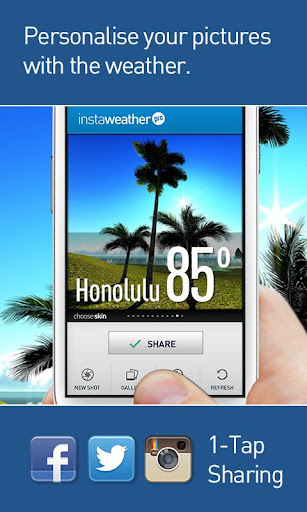
Overview: Escaping for the weekend and your friends are staying home? Make them suffer with a beach photo and weather conditions from Hawaii or Malibu.


Photo from a morning session of seaside jogging? Make your friends jealous.
Traveling across sunny and colourful Thailand when it’s a cold and dark winter in Minneapolis? Show them who is the real player here!
Snowboarding in Colorado in deep powder and sunny 25F when your mates are closed in an office space with no chances for holidays? YOU RULE!


How does it work?
– InstaWeather PRO is your weather overlay App for Instagram!
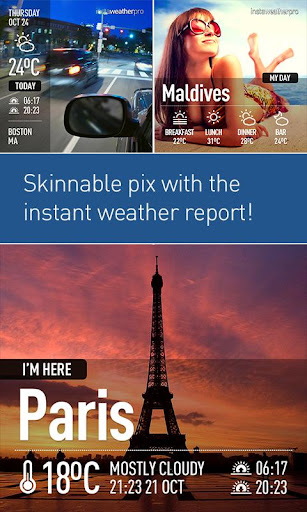
Thanks to InstaWeather Pro you can share on Instagram the weather report and forecast from the place where your are now – on top of your favourite photo that you have just snapped with your iPhone.


Picture shared through Instagram, combined with all the important forecast data and place name, gives full view of actual outside conditions!


InstaWeather PRO is full of features:
You can easily choose your favourite skin from 15 available with various weather data: from current temperature and simple info about the location to very detailed forecast with air pressure, temperature, rain, wind power and direction.


You can also choose the period of the displayed forecast: today, next few days or a whole week.


It works with Celsius & Fahrenheit, kilometres, miles and many others.


Install and share the weather with friends! Let the weather be always good for you!


Make your personal weather report NOW!!


What’s in this version : (Updated : Jul 31, 2013)
added support for FullHD phones
fixed possible crash bug when entering custom location
quality fix for Instagram uploads – now your pictures will look as good as possible


More Info:
Code:


Code:


https://play.google.com/store/apps/details?id=air.byss.mobi.instaweatherpro


Download Instructions:
http://uploaded.net/file/9711ck40


Mirror:
http://cloudzer.net/file/0pu2z84a


Read more

History Eraser v5.1.4 Ad-Free


History Eraser v5.1.4 Ad-Free
Requirements: Android 1.6+
Overview: This is the ad free version of History Eraser! One touch cleaner! History Eraser can erase history data on your Android device, cleanup your phone, delete your search history, remove your calllog, delete sms, clean your clipboard, clear all apps’ cache files, clear frequently callded, and erase market search history. It is similar to ccleaner on the pc.


It’s a history eraser for android device, and it can clean history of apps by only one tap. It’s similar to the "ccleaner" on PC. It can help you to protect your privacy, and it can also help you to free up the internal storage. No root premission required!


Feature:
★Clear Browser History
★Clear Call Log
★Clear text messages
★Clear Market Search History (including new android market history of v3.0.26+)
★Clear Google Map Search History
★Clear Gmail Search History
★Clear Clipboard Data
★Clear Youtube Search History (assist)
★Clear Google Search History(Android >= 1.6) (assistance)
★Clear all app cache files
★Clear Frequently Called (Frequently Contacted)


Feel free to send feedback to us other than 1 star!!


If forceclose happens, please use our another app named ‘App Cache Cleaner’ to do a clean-all action, and then open History Eraser again


#How to clean your Google Map history
If your Google Map history still comes out after clean, please visit http://www.google.com/history to disable the history records for your Google account.


***************************
INFOLIFE, Make Life Easier!
***************************


—-version 2.5.5 changes:
1.add sms clear options to one touch clear list
now we can seperately del 4 kinds of thread,including:
a) Sent SMS/MMS
b) Received SMS/MMS
c) Failed SMS/MMS
d) SMS/MMS Draft


By using setting menu, you can alse choose not to del sms/mms when screen off or you can choose not to delete locked/protected sms/mms


—-version 2.5 changes:
1.add auto clear and preference setting
you can have schedule clear by menu-> setting -> select Clear When Screen Off.It will auto execute your last clear operation when screen off.
you can also set notification bar icon here and turn on phone rom memory statistics display.


2.add frequently called (Frequently Contacted) clear
some devices have a frequently called list in favorites tab.now the delete operation of this list is available.


3.add phone memory status showing
show your phone rom memory statistics.you can see how much memory freed after clear.


4.use new text message deletion and move this function to menu options
txt message deletion option moved to menu,you can delete all of your sms/mms by menu-> Del All SMS/MMS,Be ware that ALL of your text message will be deleted even if they are locked!


5.add option to show notification bar
you can show notification bar to have a quick switch.to enable this:
menu->Setting->check Notification Bar Icon.


6.adjust item display order.
move clear all apps cache function to the top of the list.


***Features under development***
1,contacts history or sms history in motorola phones:
Motorola doesn’t share their communication logs with other apps,I am still working on it to figure out a way to clear this history.


To help us translate thiss app to your native language, please sign up in http://crowdin.net/project/history-eraser
thank you very much


Recent changes:
#4.4.6
add Danish Hungarian Polish and Ukrainian localization
#4.4.3
trivial bug fixes
#v4.4.2
1. improve user experience of widget
2. add localization of Czech
3. fix a bug of translation setting
#v4.4.1
fix a little bug of ui
#v4.4
android 4.0 style UI
#v4.3
fix a few bugs
#v4.2
fix cache cleaner for android 4.2
#v4.1.1
fixed a fc bug caused by banner


Visit Website
Less description »


Note: all premium features available.


This app has no advertisements


More Info:


Code:


https://play.google.com/store/apps/details?id=mobi.infolife.eraser


Download Instructions:
http://uploaded.net/file/mgddipqg


Mirror:
http://extabit.com/file/28ctlp8x56eb4


Read more

PDF Max: The #1 PDF Reader! v1.1.0


PDF Max: The #1 PDF Reader! v1.1.0
Requirements: Android O/S : 2.2+
Overview: PDF Max is the 5-star rated, full-featured PDF reader used by millions of iPhone/iPad users world-wide and now available for your Android!

[break]
It was designed for those people who’re looking for a full-featured, touch-based optimization & professional PDF application. It provides all features you need for an everyday PDF app in one place so that you do not need to spend extra money for other apps.

PDF Max features include:


[PROFESSIONAL PDF READER]


TEXT REFLOW: PDF Max includes an Amazing Text Reflow feature that helps you read your PDF easily with any kind of PDF. Forget the tedious pan & zoom steps, you now just enjoy reading your documents.


TEXT TO SPEECH: Don’t keep your eyes on the screen all the time, Let the superb TTS feature in PDF Max does the work: It read PDF documents for you.


FAST RENDERING: PDF Max equips a super-fast rendering engine worked smoothly on all Android Phones/Tablets with Android 2.2 or newer.


FAST SCROLLING: PDF Max is the best PDF app that allows continuous vertical scroll through an entire document. You can also set the option to view one page at a time, it’s your choice.


SMART ZOOM: Double-tap on text blocks and PDF Max will zoom the touched text block to fit the screen. Simple & efficient reading.


UI & NAVIGATE: The Navigation Panel lets you interact with your documents by thumbnails, bookmarks, annotations, PDF outline, Search or other common actions.


LARGE PDFs: PDF Max opens large PDFs easily without any problem. The maximum file size is only depending on the file size supported by the device itself.


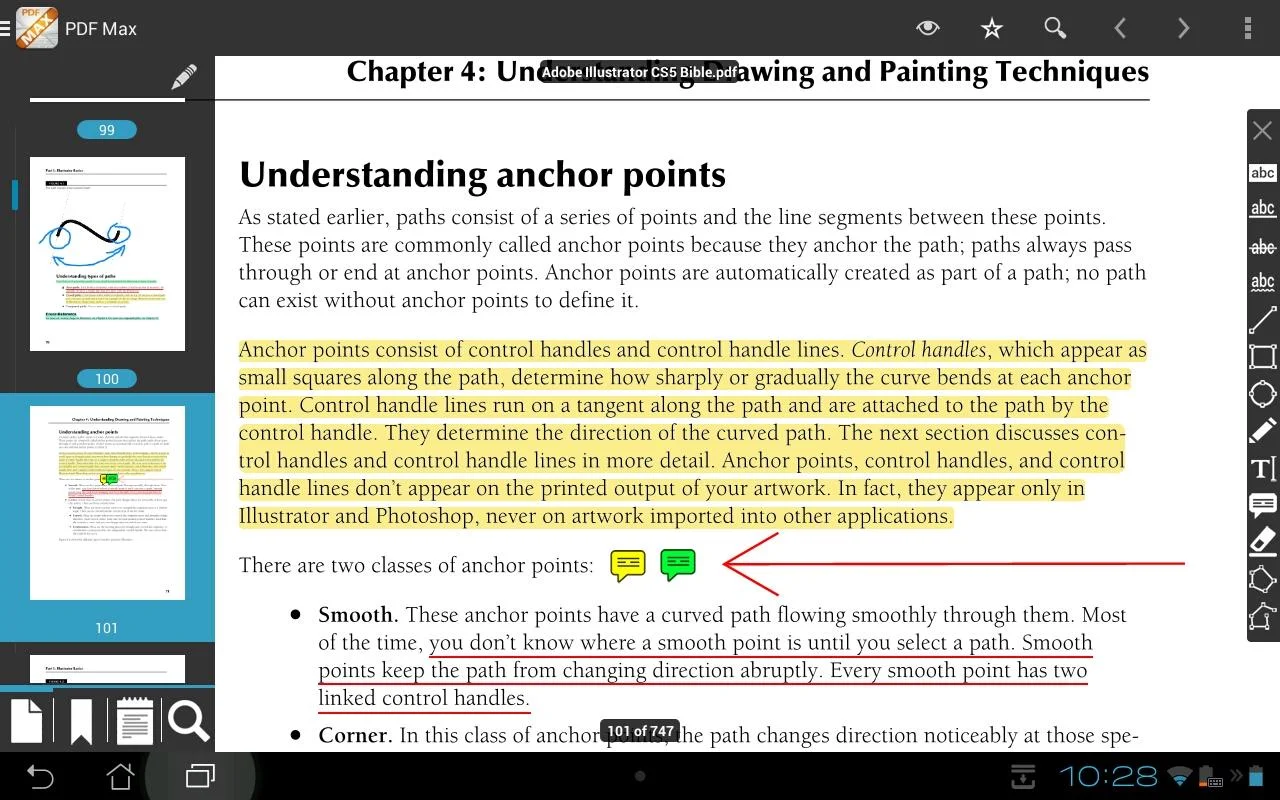
[FULL-FEATURED PDF ANNOTATOR]


TYPE ON YOUR PDF:
PDF Max lets you insert text into your PDF by creating FreeTexts (a.k.a TypeWriter).


DRAW WITH YOUR FINGER:
Use your finger or a stylus to take handwritten notes or highlight text in books, whether normal PDF or scanned. Eraser is of course also included to help you correct and refine your handwriting.


MARK UP TEXT:
Mark important things in books, journals or documents using Highlight, Underline, Cross-out and Squiggly tools.


CREATE NOTES AND CONVERSATIONS:
Add comments anywhere in the document. PDF Max even supports thread-conversations to help you collaborate with others like never before.


DRAW ANY SHAPE:
Draw, position and resize a multitude of shapes, including Rectangles, Lines, Ovals, Polylines, and Polygons with intelligent snapping.


MANAGE PDF PAGES, BOOKMARKS:
You can reorder pages, insert blank pages and even delete PDF pages. PDF Max also supports manage PDF Bookmarks.


[EASY TO USE AND POWERFUL FILE MANAGER]
Manage your own PDF library or all your PDFs on your devices easily with an intuitive File Management Interface. Dropbox is supported, more storages will be supported in the next updates.


What’s New
Version 1.1:
– Android 4.3 support.
– Enhanced PDF Engine.
– Fixed some bugs reported by users.
– Small enhancements.


This app has no advertisements


More Info:


Code:


https://play.google.com/store/apps/details?id=com.mbr.camellia


Download Instructions:
http://ul.to/0f054ur1


mirror:
http://hugefiles.net/xpk5xzegn6vv
http://rapidgator.net/file/70435d4cc…1.1.0.apk.html


Read more